What Is the Best Way to Send MRI, CT or X-rays for Review?
For a complex orthopedic second opinion, the actual images can be more useful than the written report alone. MRI and CT studies contain many slices and sequences, and the relevant finding may not be represented in a screenshot selected by the patient.
This guide is designed for patients outside Egypt who want to send existing imaging before deciding whether travel for orthopedic oncology, limb-salvage, joint-replacement, revision or complex-reconstruction assessment is appropriate.
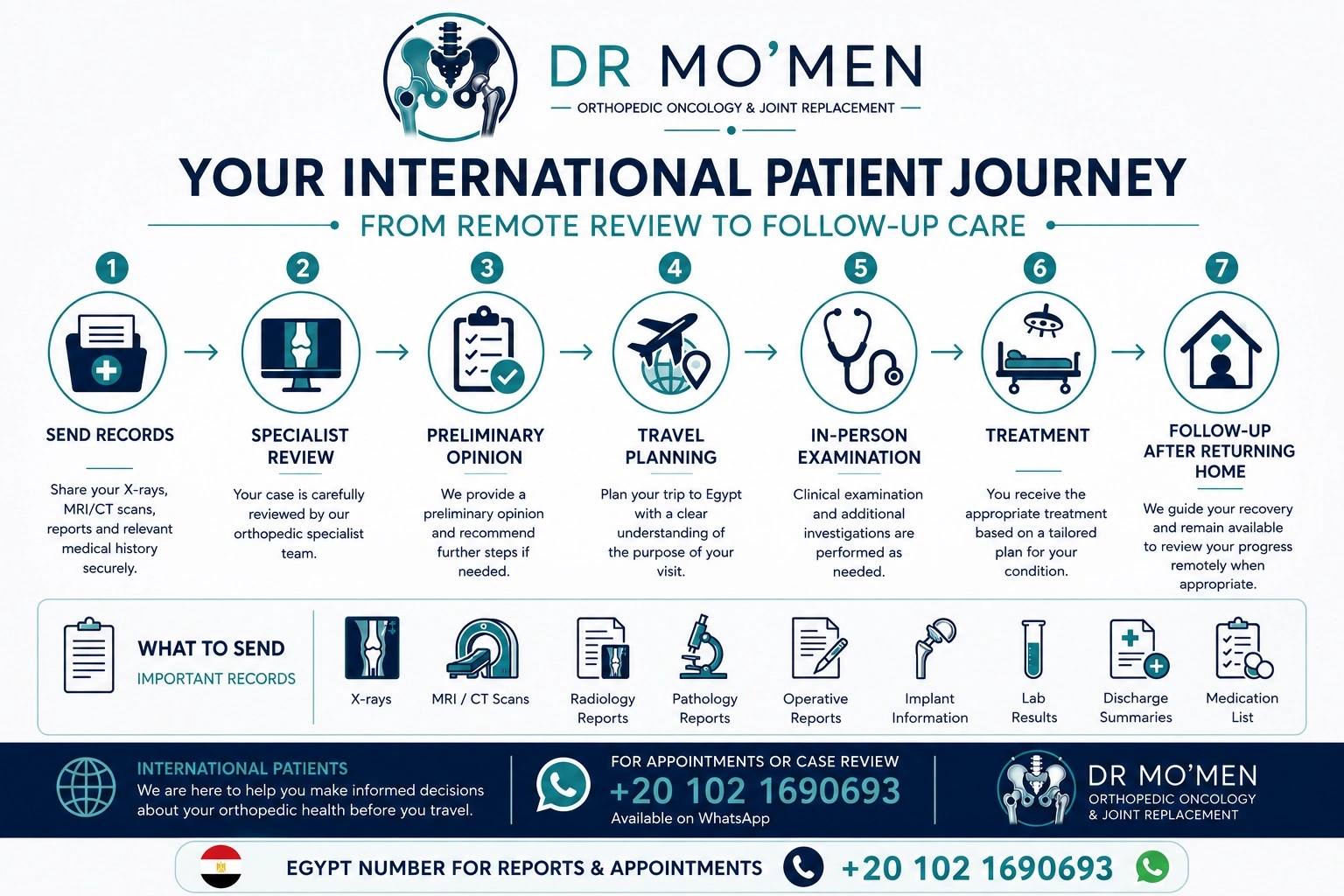
What Files Should You Send?
- Original imaging: X-rays, MRI and CT studies in their original digital format whenever available.
- Radiology reports: PDF, clear scan or portal download.
- Pathology reports: if a biopsy or tumor excision has already been performed.
- Operative notes: especially after fixation, joint replacement, tumor surgery or previous revision.
- Implant information: implant card, model or previous hospital record when available.
- Relevant laboratory results: particularly if infection or inflammatory disease is being considered.
- Short clinical summary: age, main problem, side, duration, previous treatment and current symptoms.
Images and the Radiology Report Are Not the Same Thing
| What you send | What it provides | Why both may matter |
|---|---|---|
| Original MRI / CT / X-ray images | The actual anatomy, lesion, implant, fracture or reconstruction | The specialist can review the study directly rather than relying on a summary |
| Radiology report | The radiologist's written interpretation | Useful context, but it may not answer the orthopedic surgical question |
| Screenshots or phone photos | Limited selected views | Helpful for orientation, but usually not a substitute for the complete study |
What Is DICOM?
DICOM stands for Digital Imaging and Communications in Medicine. It is the international standard used for medical images and related information. MRI and CT examinations usually contain many DICOM files arranged into image series rather than a single photograph.
You normally do not need to open every DICOM file yourself. The goal is to send the complete study so that it can be reviewed in an appropriate medical imaging viewer.
How Do I Get the Original Scan From the Imaging Center?
- Ask for the original digital images, not only the printed film or report.
- Request the MRI/CT/X-ray study as a DICOM export, patient portal download, CD or USB copy.
- If the center provides a download link, confirm that it opens outside the imaging center's own computer system.
- Keep the written radiology report with the imaging study.
- If the study concerns a tumor, include any previous imaging for comparison whenever available.
How to Share a Google Drive Folder
- Upload the DICOM folder or a ZIP archive to Google Drive.
- Select the file or folder and choose Share.
- Choose the access level carefully. Viewer access is usually sufficient for review.
- If you use an “Anyone with the link” setting so the clinic can open the files without a specific Google account, understand that anyone who receives that link may also be able to open it.
- Copy the link and test it before sending—ideally in a private/incognito browser window where you are not already signed in.
- Send the working link to the clinic by WhatsApp together with your name and a short clinical summary.
If you prefer more restrictive sharing, ask the clinic first whether a specific recipient option is available. Do not make medical imaging folders publicly searchable.
How to Share a OneDrive Folder
- Upload the complete study folder or ZIP archive to OneDrive.
- Select Share and review the link settings.
- Use view-only access unless editing is genuinely required.
- Choose a more restrictive recipient setting when practical; otherwise understand the privacy implications of an “Anyone” link.
- Copy the link, test it, and then send it to the clinic.
How to Send a Large Study With WeTransfer
- Place the complete DICOM study in one folder. If preserving the folder structure is important, create a ZIP archive first.
- Add the ZIP or folder to WeTransfer.
- Choose an email transfer or a link transfer according to the service options available to you.
- After the upload finishes, copy the transfer link.
- Send the link to the clinic by WhatsApp with your name and clinical summary.
Transfer services can have file-size, expiry and privacy settings that change over time. Review the service's current options before uploading medical records.
Which Sharing Method Should I Use?
| Method | Useful when | Check before sending |
|---|---|---|
| Google Drive | You already use Google Drive or need a persistent folder link | Viewer permission, who can open the link, whether the link was tested |
| OneDrive | Your files are already in Microsoft storage | View vs edit access, recipient restrictions, link expiry if used |
| WeTransfer | You want to upload a large ZIP and generate a transfer link | Transfer expiry, recipient/link mode and any privacy controls |
| Imaging-center portal | The radiology center provides an external share link | That the link works outside your own account and has not already expired |
Privacy: Medical Images Can Contain Personal Information
DICOM studies may contain patient-identifying information as part of the medical imaging metadata. Do not post scan links on public social media, forums or websites. Before sharing, understand who can open the link and whether it can be forwarded.
If you create a broadly accessible link for practical reasons, you can revoke or restrict it after the review. Keep a copy of the original files on your own device or storage.
MoemenOrtho does not describe ordinary WhatsApp, Google Drive, OneDrive or WeTransfer links as a dedicated secure medical-record portal. The purpose of this guide is to help patients share existing records more reliably while making the privacy trade-offs clear.
What Should You Send With the Link?
- Full name.
- Age.
- Country.
- Which limb or joint is affected.
- Brief diagnosis if already known.
- Main current symptom or reason for review.
- Previous operations and dates when relevant.
- A list of the files included in the link.
Special Note for Suspected Bone or Soft-Tissue Tumors
If a scan suggests a possible primary bone or soft-tissue tumor, the sequence of imaging and biopsy matters. When specialist review can reasonably be obtained first, avoid arranging an unplanned biopsy or mass excision simply to obtain a diagnosis before sending the case.
Does Every Bone Tumor Need a Biopsy? · Orthopedic Oncology
What Happens After the Records Are Received?
The available information can be reviewed to determine whether the problem is reasonably clear, whether additional imaging or investigations may be needed, and whether an in-person orthopedic consultation in Egypt appears appropriate. Complex tumor, infection and revision cases may require further pathology, laboratory or multidisciplinary review.
A preliminary remote review does not guarantee that surgery is needed, that a particular operation is feasible, or that the treatment plan can be finalized before examination.
When Remote Review Is Not Enough
Urgent or rapidly worsening symptoms should be assessed locally rather than waiting for an online review. Likewise, definitive surgical planning may require physical examination, updated weight-bearing radiographs, laboratory testing, aspiration, pathology review or additional imaging.
Frequently Asked Questions
Do I need to send both the scan images and the radiology report?
Whenever possible, send both. The report summarizes the radiologist’s interpretation, while the original MRI, CT or X-ray images allow the orthopedic specialist to review the actual study, sequence by sequence, in clinical context.
What is a DICOM file?
DICOM is the standard format used for medical images and related information. MRI and CT studies usually contain many DICOM files rather than one picture. Keeping the original study folder intact is preferable to sending only screenshots.
Can I send MRI screenshots through WhatsApp instead of the full study?
Screenshots can help with orientation but are not a substitute for the complete MRI or CT study when detailed review is needed. A cloud or transfer link to the original DICOM study is usually more useful.
How should I share a large MRI or CT study?
You can upload the original study folder or a ZIP archive to a file-sharing service such as Google Drive, OneDrive or WeTransfer, then send the access link. Check the permissions before sending and avoid posting the link publicly.
Can a final diagnosis or surgical plan be made from a remote scan review?
Not always. Remote review can clarify the likely next step and identify what additional information may be needed, but final diagnosis and treatment planning may require examination, updated imaging, laboratory tests, pathology review or multidisciplinary assessment.
What if the scan shows a possible bone or soft-tissue tumor?
Send the available imaging and reports before arranging an unplanned biopsy or excision when specialist review can reasonably be obtained first. Biopsy planning can influence later definitive surgery.
Technical References for File Sharing
- DICOM Standard — medical imaging and related information
- Google Drive Help — sharing files and folders
- Microsoft Support — sharing files and folders in OneDrive
- WeTransfer Help — sending a transfer or link
Send Your Records Before You Travel
If you are considering specialist orthopedic care in Egypt, send the available imaging and reports first. The initial review can help identify what information is missing and whether an in-person consultation is appropriate.
Send the File Link by WhatsApp International Patients Second Opinion
Medical Disclaimer
This guide is for patient education and file-sharing orientation. Remote review of imaging or medical records does not replace clinical examination, complete diagnostic assessment, emergency care when needed, or an individualized treatment plan.